Work experience Journal - Day 23
- Feb 7, 2019
- 3 min read
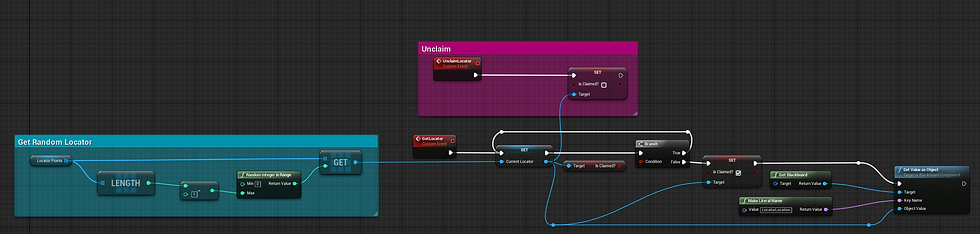
I got the AI to work how I intended it to work by removing the "has locator" variable and changing the order of the node and what they're connected to.

Afterwards, I was tasked to research casino's and see what I could make during the time left. I suggested making an intractable casino machine but the lead developer suggest to make an destructible casino machine.
So I set my focus on creating a breakable casino machine with effects but I had an issue, the tutorial I was watching had an option for creating destructible meshes and mine version of Unreal (4.20.2) didn't. After searching for a solution on google I found someone else who had the same problem. Luckily, a user called Everynone had replied saying that "From the 4.18 notes: Physics APEX Destruction has been moved to a plugin and is now disabled by default." Now that I know this I am able to activate plugins that previously I didn't know existed which opens a new range of possibilities for me to explore and experiment with.
The next problem I faced with the casino machine was that I was unable to change the fracture effects from the actor blueprints so I followed a guide by maxplug5 to add effects to the chunks.
I had another completely different issue with the effects. The particle effects weren't playing and I couldn't figure out how. Later, I realised that I didn't put any effects into the effects variable. After experiencing this, I now know I should always check to see if everything is in the right place before debugging and tweaking the blueprints to make it work.
Then I tried to brainstorm other ideas to make the casino more lively. We ending up agreeing to try and make dynamic water for the fountains and a swimming pool. I saw two ways to try and accomplish this. The first way to accomplish this feat is by using 2D water simulation and the second way is by using Nvidia Flex. I ended up going with 2D water physics as one of the major drawbacks of using Nvidia Flex is that it is very GPU intensive due to the real time visual effects used. I didn't want to push the minimum requirements up as this would restrict the amount of users able to play the game.
The started following a online tutorial on "Interactive 2D Fluid Simulation in Unreal" by UnrealEngine. While the overall tutorial was very interesting, it wasn't designed to be followed by a novice, it was more focused towards experts. As much as I tried to get it to work I just couldn't due to the steps he glossed or skipped over. I probably should having stopped after I realised that it was directed to an more experienced audience but upon I got so far into it, I felt like I should continue to the tutorial so that the time I spend won't go to waste.
Harvard Referencing Anon (n.d.) 09 - Dynamic Material Instances. Available from: https://api.unrealengine.com/INT/Videos/PLZlv_N0_O1gbQjgY0nDwZNYe_N8IcYWS-/srUSDU1u0og/index.html [Accessed 7 February 2019].
Anon (n.d.) Creating and using Material Instances.. Available from: https://docs.unrealengine.com/en-us/Engine/Rendering/Materials/HowTo/Instancing [Accessed 7 February 2019].
Anon (2017) How do I create a destructible mesh? - UE4 AnswerHub. Available from: https://answers.unrealengine.com/questions/721420/how-do-i-create-a-destructible-mesh.html [Accessed 7 February 2019].
Anon (2019) How to attach effects to Fracture chunks (Guide) - Unreal Engine Forums. Available from: https://forums.unrealengine.com/development-discussion/content-creation/1498018-how-to-attach-effects-to-fracture-chunks-guide [Accessed 7 February 2019].
Anon (n.d.) Live Training - Making a Destructible Mesh. Available from: https://api.unrealengine.com/INT/Videos/PLZlv_N0_O1gYeJX3xX44yzOb7_kTS7FPM/-gGiEmYj4oE/index.html [Accessed 7 February 2019].
Gabriel Traveler (2017) Exploring Las Vegas: Tour of a Casino on the Strip. [online]. Available from: https://www.youtube.com/watch?v=TfrYsqbfHB0 [Accessed 7 February 2019].
Living in Las Vegas (2017) Walking Thru Luxor Las Vegas!. [online]. Available from: https://www.youtube.com/watch?v=RAD4U1uern0 [Accessed 7 February 2019].
Marvel Master (2019) FREE Unreal Engine 4 Reactive Dynamic Water V3 Project Download [UE4.20]. [online]. Available from: https://www.youtube.com/watch?v=pX82z77TZc4 [Accessed 7 February 2019].
Nannestad, A. (2019) Introduction on how to use Nvidia Flex in UE 4. [online]. Available from: https://www.youtube.com/watch?v=IEnVWCOQ8eU [Accessed 7 February 2019].
Twix (2019) Unreal Engine 4 Tutorial - Destructible Meshes. [online]. Available from: https://www.youtube.com/watch?v=gbfkP55KLdc [Accessed 7 February 2019].
UnrealEngine (2017) Interactive 2D Fluid Simulations in Unreal | GDC 2017 | Unreal Engine. [online]. Available from: https://www.youtube.com/watch?v=5FRH1oJHOvA [Accessed 7 February 2019].
Everynone. (2017) How do I create a destructible mesh?. UE4 ANSWERHUB, 02 November [online]. Available from: https://answers.unrealengine.com/questions/721420/how-do-i-create-a-destructible-mesh.html [7 February 2019].
Comments